
mRemoteNXT
The native macOS alternative to mRemoteNG. SSH, RDP, Telnet, SFTP and HTTP/HTTPS in tabs.
~21 MB · macOS 14+ · Apple Silicon · GPL-2.0
Screenshots
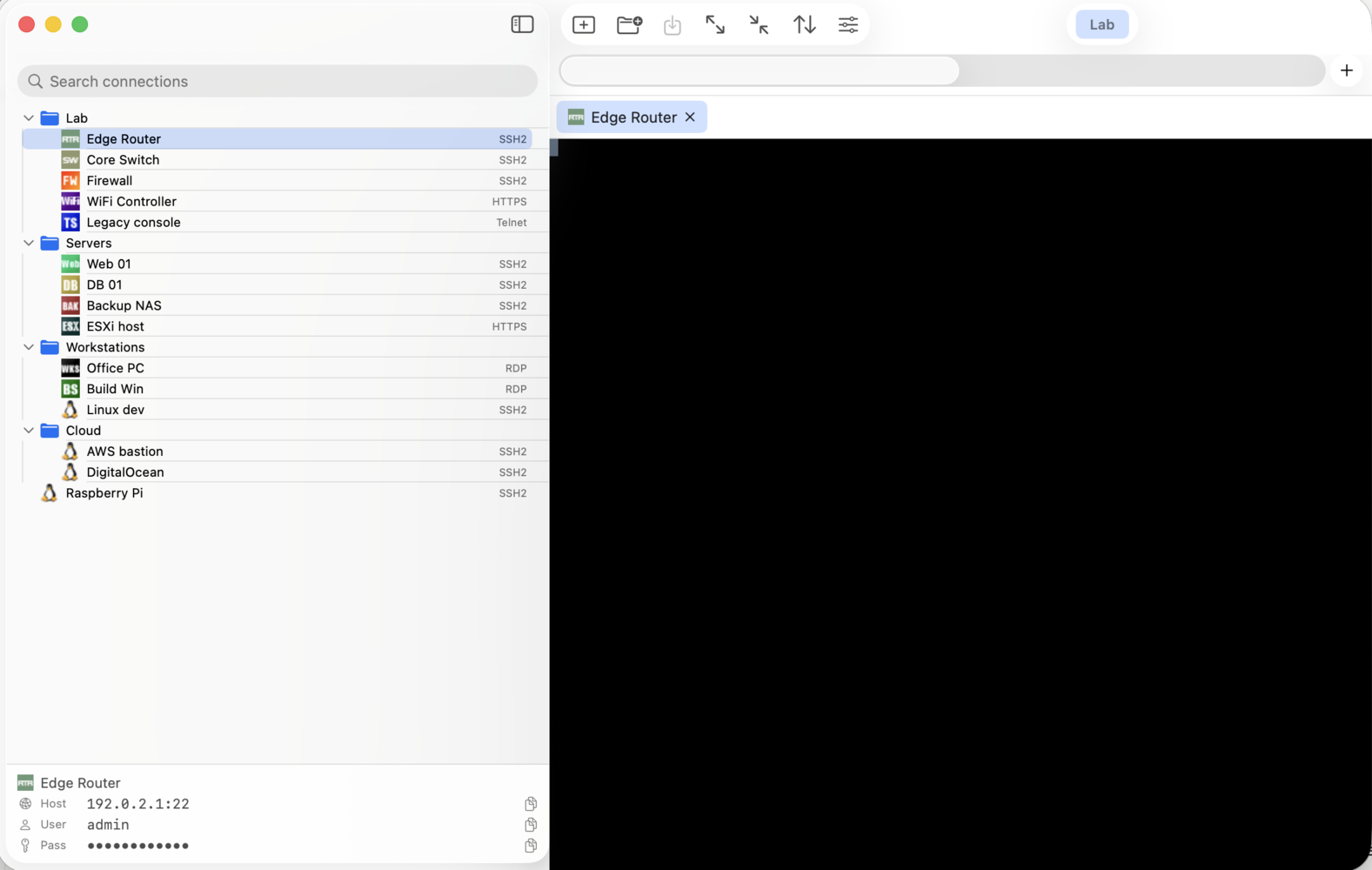
Main view: connection tree, panels, embedded SSH tab and bottom status bar with click-to-copy host / user / password.
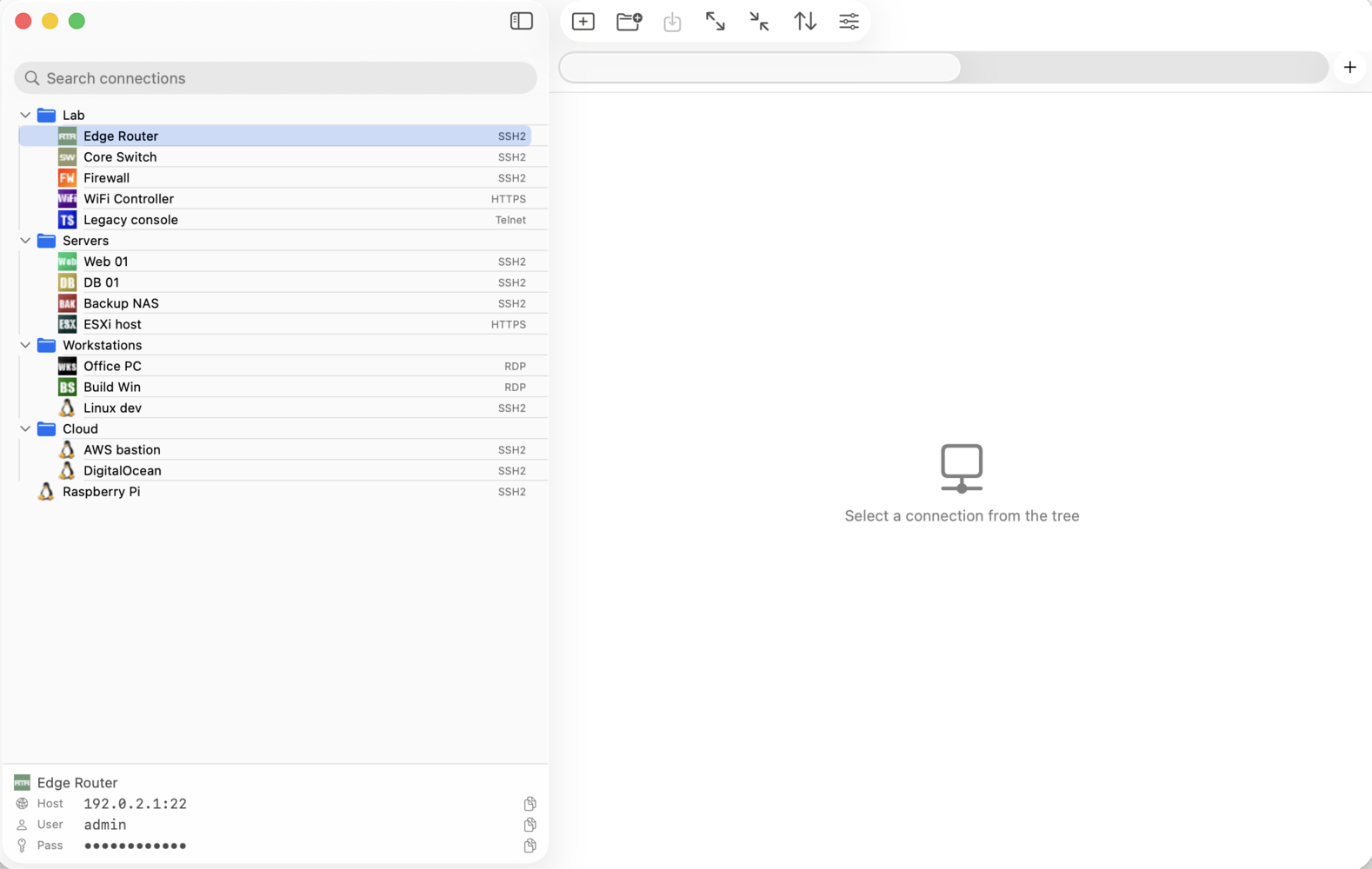
Empty workspace.
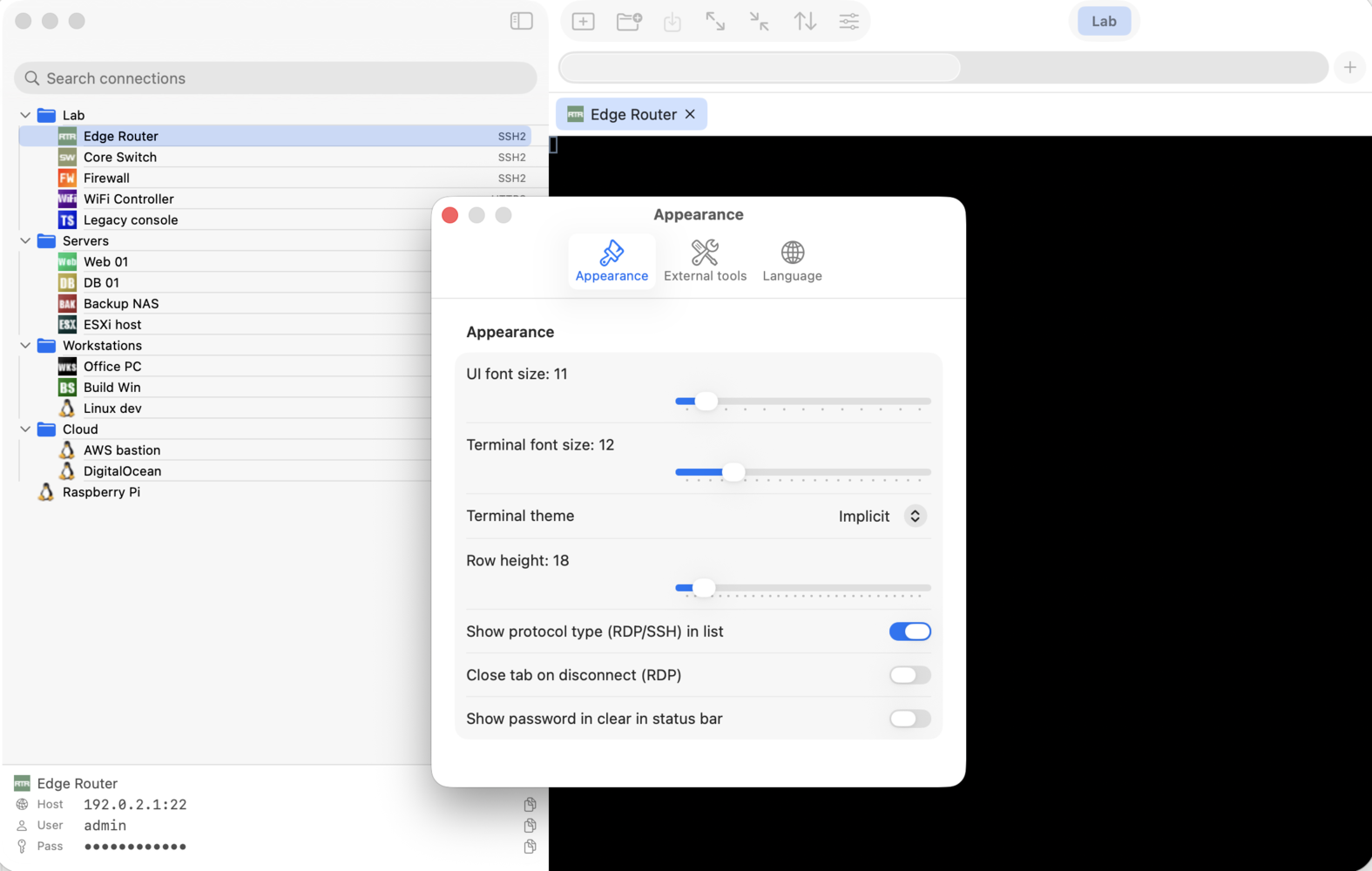
Settings · Appearance.
All hosts come from the bundled demo config — IANA documentation IPs, no real machines.
Why mRemoteNXT?
If you use mRemoteNG on Windows and you want the same
connection tree, encrypted passwords, panels and tabs on your Mac,
mRemoteNXT imports your confCons.xml directly — no
conversion, no re-typing.
The format is preserved byte-exact: passwords stay
encrypted with the same scheme (PBKDF2-HMAC-SHA1 + AES-256-GCM,
documented default passphrase or a custom one), and files
saved by mRemoteNXT on macOS are read back by mRemoteNG on Windows
without complaint. You can keep one file in Dropbox or iCloud and
work from both platforms.
Features
- Tree with foldersAttribute inheritance, drag&drop reorder, original mRemoteNG icons, guide lines.
- PanelsGroup connections into top-level tabs, like on Windows.
- Search / filterBy name, host, protocol, description.
- SSH + TelnetEmbedded in tabs via SwiftTerm. PuTTY-style copy-on-select + right-click paste.
- SFTPRight-click an SSH connection → Transfer files.
- RDPEmbedded via FreeRDP. GFX pipeline, live resize, Retina DPI, Ctrl+Alt+Del.
- HTTP / HTTPSWKWebView with auto-fill for router / iLO / switch web UIs.
- External toolsCustom commands with macros (%Host%, %Username%, ...).
- Auto-backupEvery save creates a timestamped copy. Your original file is never lost.
- ThemesDefault, Solarized, Dracula, Nord, macOS Light, more. Live font-size adjust.
- UI in four languagesEnglish, French, Polish or Romanian, switchable from Settings.
- Self-contained .dmgNo Homebrew install needed. FreeRDP, OpenSSL etc. are bundled.
Install
- Download the latest
.dmg from the releases page.
- Open the
.dmg, drag mRemoteNXT.app to the Applications shortcut.
- Open mRemoteNXT.app from
/Applications and use ⌘O to load your confCons.xml or ⌘N to start from scratch.
No Homebrew required. The .dmg bundles
FreeRDP and OpenSSL inside the app (~21 MB total). Build-from-source
details and the packaging script are on GitHub.
Changelog
Mirrors the GitHub releases exactly. Newest first.
Files copied in Windows paste into the Finder, keyboard layouts that reach Windows, Remote Desktop Gateway, .rdp files and a full screen that belongs to the session.
- Paste files copied in Windows into the Finder. Copy files or folders in Explorer and press ⌘V in a Finder window — the other half of the file clipboard 0.8.12 started. Nothing moves when you copy; the bytes are read only when the Finder pastes, in a window that shows speed, time left and, when a copy fails, why. The files arrive through a macOS file provider, which macOS keeps switched off until you allow it once (System Settings › General › Login Items & Extensions › File Providers); the first copy that finds it off says so, with a button to that page.
- The mouse pointer no longer disappears. With several RDP tabs open, a Windows box in a background tab that hid its pointer — a locked screen, a video — hid it over the tab on screen too. Only the tab on screen sets the cursor now.
- Keyboard layouts (#13). With a Canadian layout, typing in PowerShell did nothing. The table that tells Windows which layout the Mac uses has been rebuilt — about a hundred macOS layouts, each checked against what its keys type — and a layout with only a close match, or none, says so in a notice over the session. Underneath were two bugs: the announced layout never actually reached the server, and on ISO keyboards the key left of Z went out as the key left of 1. Ctrl+Option+Delete sends Ctrl+Alt+Del, and Settings can keep Option from reaching Windows as Alt and choose which Command key stands in for Ctrl.
- Remote Desktop Gateway (#14). mRemoteNG's per-connection gateway settings are used when connecting — never, always or detect, the gateway host, the connection's own logon or separate credentials — all inheritable, so a gateway set on a folder serves every connection in it. A notice the gateway asks you to accept appears as a dialog.
- .rdp files (#15). File › Import RDP Files adds as many .rdp files as you pick to the selected folder. Saved passwords don't come along: an .rdp file keeps them encrypted for the Windows account that saved it. An .rdp file opened from the Finder, or an rdp:// link, connects straight away after asking for credentials, without adding anything to your configuration.
- Full screen (#16). The sidebar, the toolbar and the tab bars make way for the session and come back on the way out; ⇧⌘] and ⇧⌘[ move between tabs, View › Hide Tab Bars (⌥⌘T) works in a window too. Settings decides when the menu bar may come down over the session — as macOS does it, after three seconds at the top edge, or never.
v0.8.13-alpha
· 2026-09-11
— The panel switcher is back where you can see it, and each panel remembers its tab
- The panel switcher is back where you can see it. An hour after 0.8.12: a window with 54 tabs across 12 panels showed the two tabs of the current panel and no way to the rest. The switcher sat in the toolbar, and as soon as the other items needed the room — with a dozen panels, always — macOS folded it into the overflow chevron, where it rendered as one greyed-out name that did nothing. Not new in 0.8.12; it needed enough panels to show. The switcher now lives in the content, on its own row above the session tabs, where no toolbar can swallow it; it scrolls sideways when the panels outgrow the window, and each name carries the number of tabs behind it.
- Each panel remembers its tab. Switching to another panel and back used to land on the first tab of the panel, whatever you had been doing there. Each panel now returns to the tab you left it on; only if that tab has been closed in the meantime does it fall back to the first.
v0.8.12-alpha
· 2026-09-11
— Connections through a jump host, files pasted into Windows, a divider that moves again, and a duplicate that is finally its own connection
- SSH jump hosts. A connection can be reached through another one: the editor of any SSH connection has a Jump host field listing the other SSH connections in the file, and the session goes out as
ssh -J bastion target. The bastion's user, port and password come from its own connection, so nothing is typed twice and renaming it changes nothing; a bastion with a jump host of its own makes a chain, and the caption spells the route out. Passwords along the route are answered one machine at a time, matched to the host OpenSSH names in its prompt rather than dealt out in order — a hop that authenticates by key never prompts and never steals the next machine's password, and a wrong password ends the answering rather than trying the next entry on the wrong server. SFTP takes the same route. The file gains one attribute, NXTJumpConnectionId, only where it is used; mRemoteNG ignores it and drops it when saving from Windows.
- Files from the Mac, pasted into an RDP session. Copy files or folders in the Finder, paste them in Explorer. Nothing is copied ahead of time: the session announces the list and Windows reads each file's bytes as it writes it, so a large folder costs nothing until the paste. Folders keep their structure. The other direction is not there yet.
- The sidebar divider moves again. Dragging it with many tabs open had become a crawl. Profiling put half of it on a fix from the previous build that resized every hidden terminal at each pause of the hand — ten thousand scrollback lines each, all at once. A hidden terminal is now sized only when its tab is shown; a hidden remote desktop waits for the mouse button to come up. Separately, every remote desktop frame used to be re-rendered through a colour-space conversion on the main thread before reaching the screen; it now goes to the layer as it is.
- Duplicate could not make two connections. Duplicating wrote two nodes with the same
Id into the file; from the next load on the tree selected both, the editor changed one when the other was meant, and a restored session found the wrong one. The copy now carries its own id, a file already holding duplicates is repaired on load and saved, and a connection created in the app — which never had an Id and was assigned a random one on every launch — has one now, so remembered tabs on it come back. Found alongside: a host pasted with a line break in front of it went nowhere, so the field no longer accepts one and the value is trimmed when used; and line breaks inside attributes are written as character references, as mRemoteNG writes them, so they survive a round trip.
v0.8.11-alpha
· 2026-09-03
— A saved SSH password works on its own, and Brazilian Portuguese makes six languages
- SSH passwords, with nothing left to install. A saved SSH password used to be handed to
sshpass, a separate command-line program that had to be installed by hand before the feature worked at all — and nothing in the app said so, so a saved password simply did nothing and the server asked again, which looks exactly like a password being wrong. The app now answers the prompt itself: no helper, nothing to get right on PATH, and the password never becomes an argument or an environment variable of a second process. It answers only while all of this holds: a password is saved on that connection; the prompt arrives within fifteen seconds of connecting; what the server has written ends in password:, the colon being what makes it a prompt rather than a sentence that mentions one; and the word passphrase appears nowhere in it, so a locked private key is never answered with an account password. The first key you press disarms it for good, as do the first answer and the deadline — a sudo a minute into the session gets nothing from the app. If sshpass was on your Mac only for mRemoteNXT, it can go.
- Brazilian Portuguese, contributed by @LeMarchini. A sixth interface language, all 243 strings. Languages carrying a region now resolve properly when the interface language is left on the system setting: a Mac set to Brazilian Portuguese used to land in English, because the lookup cut the code down to two letters and went looking for
pt, which is not what the folder is called. It takes an exact match first and falls back to any bundled language sharing the base.
v0.8.10-alpha
· 2026-08-20
— Console programs finally receive what you type, and Turkish makes five languages
- Fixed: typing in console programs over RDP. Reported in #9. In
powershell.exe every letter and digit vanished, while arrows, Enter and Space worked and cmd.exe was fine throughout. That split was the whole diagnosis: arrows left the app as key positions, letters left as characters, and a console program reading raw keyboard input discards a character-only event because it carries no virtual key code — where cmd.exe reads in line mode and keeps the character. Not a regression: the same code sent letters in 0.8.8 and 0.8.9, and the reporter confirmed 0.8.8 behaves identically. Ordinary typing now goes out as key positions, which only became safe once the server is told which layout to read them through — the keyboard layout was never announced at all, and without it a Romanian Mac against a US-configured Windows would produce US characters. It is taken from the Mac's current input source; an input source with no Windows equivalent announces nothing and keeps sending characters, because guessing a layout is worse than not sending positions. Option keeps the character path deliberately, since macOS composes with Option where Windows composes with AltGr. There is a setting, on by default; off restores exactly what every previous version did.
- What's new, in the Help menu and once after an update. Help → What's new opens the release notes at any time, and the first launch of a newly installed build opens them by itself, once — a setting turns that off. The notes are fetched from the GitHub releases rather than bundled, so a version can never ship with a stale copy of its own changelog; offline and not-yet-published both land on the same sentence offering the releases page. A fresh install records the build without opening anything, there being nothing yet to be new against.
- Turkish, contributed by @emircankavas. A fifth interface language, all 243 strings, complete. He also filed the two keyboard reports behind 0.8.6 and 0.8.9, which fixed Option and AltGr input for every layout that uses it, not only Turkish. Languages remain one folder each — the app finds them in its own bundle, so a translation needs no code.
v0.8.9-alpha
· 2026-08-14
— Option types its characters into an RDP session too
- Fixed: Option could not type its characters into an RDP session. The RDP half of #9. The reporter came back after 0.8.6: it was fixed for SSH, and the same keys still came out wrong over RDP — the same mistake sitting in a second place. The path that sends ordinary typing to the remote read the character the key would produce with Option not applied, so a layout that types
@, [, { through Option sent the bare letter instead. It now reads what the layout actually produced; the comment above that line already described the intended behaviour correctly, only the property being read was wrong. Two things came with it: an empty result means the layout swallowed the press as a dead key and will hand over the composed character on the next one, so there is nothing to send; and Option is a modifier to macOS but a composition key to the layout, so Alt — already pressed on the server by then — is released for the duration of the character, since Alt+@ reaches Windows as an accelerator rather than as text. Shortcuts are untouched: Ctrl and Cmd still leave through the scancode path, which never consulted the character. Affects every layout that reaches for Option to type programming characters: Turkish, German, Polish, Spanish, Romanian.
v0.8.8-alpha
· 2026-08-12
— send a connection to another folder without dragging it there
- Move to and Copy to, as a menu shaped like the tree. Right-clicking a connection offered Duplicate, which puts the copy beside the original, and nothing else — so getting a connection somewhere else meant dragging it through a tree that scrolls. Fine for a neighbouring folder, tedious for anything further. There is now a Move to and a Copy to, each opening a cascade of the folders: every level lists its own destination first, then a submenu per child folder. The menu therefore has the shape of the tree, and each level stays a few entries long however deep the tree runs. The folder a connection already sits in is disabled under Move to, since that is not a move; it stays enabled under Copy to, where it means exactly what Duplicate means. A folder is never offered itself or anything beneath it, and a copy keeps its name — a different folder has no clash to resolve — taking a suffix only where the destination already holds that name. Both work on folders as well as connections.
- Fixed: a connection moved off the top level could end up in two places. A node at the top level lives in the document's root list and has no parent, so moving it into a folder attached it to the folder while the detach step found nothing to detach from — and the tree showed it twice, once at each place. Drag and drop went through the same call, so this was reachable before today; the new menu simply made it easy to hit.
v0.8.7-alpha
· 2026-08-10
— adding a language is one folder, and it may be unfinished
- Adding a language is now one folder. Prompted by an offer to contribute Turkish in #9. It used to mean editing four places, three of them code: a case in an enum, a display name, an array the automatic setting reads, and a list in the project file — so someone willing to hand over words needed Xcode, xcodegen and Swift to do it. The app now discovers its languages from the
.lproj folders in its own bundle: copy en.lproj/Localizable.strings to <code>.lproj/, translate the values, open a pull request. Languages are listed under their own names, taken from the system rather than written by hand — English, Français, Polski, Română.
- A translation no longer has to be complete. A key the chosen language does not carry now falls back to English. Before, it fell back to the key itself, so a partial translation showed raw identifiers like
Settings.MasterPasswordNote in the middle of the interface — which meant all 224 strings had to be finished before any of them could ship. Forty translated strings are now forty translated strings, and the rest stays as it was.
- Fixed: the automatic language setting only ever considered two. "System default" tested for Romanian and fell back to English, so a Mac set to Polish got English with the Polish translation sitting in the bundle right next to it. It now follows the system language whenever the app carries it.
v0.8.6-alpha
· 2026-08-10
— Option types what your keyboard layout says it should
- Fixed: Option could not type the characters a keyboard layout puts there. Reported from a Turkish Q layout in #9:
Option+Q should be @, Option+8 should be [, and neither arrived in an SSH session — the shell saw ESC q and ESC 8 instead. The terminal library treats Option as the Meta key by default, and in that mode it sends ESC followed by the character the key would produce without the modifier applied, so the layout's composition is discarded before it can happen. Turkish, German, Polish, Spanish and Romanian all reach for Option to type everyday programming characters; a US layout almost never does, which is why this stood for eight releases without anyone running into it. Option now composes characters the way the layout intends, which is what Terminal.app and iTerm2 do, and Meta is a new setting for anyone who wants M-x back. Option+Left and Option+Right keep moving by word in both modes: with Meta off macOS turns them into a text-editing command the terminal does not answer, so they are sent by hand rather than quietly lost.
v0.8.5-alpha
· 2026-08-08
— scrolling in a terminal works again, in every tab
- Fixed: scrolling in a terminal could stop working entirely. Two-finger scrolling, or a wheel, did nothing at all in a terminal tab — but only sometimes, which is what made it look random. Every session in a window lives in one stack of views, all at the same size, the inactive ones simply invisible; that is what keeps an ssh process alive while you work in another tab. The wheel handler was installed once per session and ran for all of them, and its test for "is the pointer over me?" was a check against the view's own rectangle — which every one of those stacked views passes, visible or not. So a tab left sitting in
less, vim or mc answered the wheel first. Being on the alternate screen, it took the event, swallowed it, and sent its arrow keys off into a session nobody was looking at, while the terminal actually on screen never heard about it. Close that tab and scrolling came back, which is why it seemed to come and go. Scrolling is now handled by the tab that is on screen, and no other. The same fix covers a quieter version of the same fault: a hidden tab's leftover selection could overwrite the clipboard on any click in the window.
- Fixed: precise scrolling read the wrong value. Inside
less and friends the scroll amount came from the field a mouse fills in with whole notches. A trackpad does not use that field — it reports in points, and leaves the other one rounded down to zero for anything gentler than a flick, so a slow, deliberate two-finger scroll had nothing to act on. Precise deltas are now read where they are actually delivered, added up, and spent a line at a time.
v0.8.4-alpha
· 2026-08-07
— an audit of the app's own code, and French
- Fixed: the web tab trusted every certificate it was shown. The intent was a self-signed certificate on a LAN device. The effect was that no certificate could ever fail — expired, self-signed, issued by anybody, on any host — while the same view types the connection's username and password into the page. The system's verdict decides again. The exception is offered only for the host the connection actually names, only when the system refuses it, and only through a dialog showing the certificate's SHA-256 fingerprint. Trusting one remembers that exact certificate for that host, and you are asked again if it ever changes — the same bargain the SSH side of the app already makes with
StrictHostKeyChecking=accept-new. Everything else the page loads goes through ordinary validation, as it should have all along.
- Fixed: autofill had no idea which host it was on. It filled in credentials on any navigation that finished, so a redirect to a different domain carried the connection's username and password with it, typed into whatever login form was waiting there, with a retry loop that kept trying for eighteen seconds. Forms are filled only on the host the connection names. HTTP Basic, Digest and NTLM answer only to that host too.
- Fixed: the SSH password travelled in the command line.
sshpass -p <password> puts the password in the process arguments, where ps shows it to every other process running as you, for as long as the session lasts. It now goes through a pipe: sshpass -d takes a file descriptor, and a descriptor is inherited by the child process and by nobody else.
- Fixed: external tools pasted connection fields straight into a shell. Macros were substituted into the command line as raw text and handed to
/bin/sh. A connection named x; reboot was two commands, not one — and confCons.xml files are routinely passed around between people, which is what this app is for. Values are shell-quoted now, and %Password% is not substituted at all: it expands to a reference, and the password travels in the environment instead of the command line. One consequence worth knowing: quote a macro yourself and you now nest quotes. Write ping %Host%, not ping "%Host%". The three tools that ship with the app were already in that form.
- Fixed: changing the master password could lose passwords silently. Any password that would not decrypt with the old passphrase was skipped, and the change carried on to rewrite the file's marker anyway — leaving those entries sealed under a key the file no longer claimed to use. Unrecoverable after the next save, and nothing said so. The whole document is converted in memory first, and one failure abandons the change with the file untouched, saying how many entries could not be read. A file carrying undecryptable leftovers from an old import now refuses the change until it is cleaned up, which is the direction that does not lose anything.
- Fixed: a failed encryption could erase a password. Encryption returned an empty string on failure, which callers stored — indistinguishable from "no password set". It returns nothing at all now, and every caller keeps what it already had.
- French. A fourth interface language, complete: all 222 strings, alongside English, Polish and Romanian, switchable in Settings without a restart. The automatic setting learned to read while it was there — it tested for Romanian and fell back to English, so a Polish system got English with the Polish translation sitting in the bundle right next to it. It now follows the system language whenever the app has it.
v0.8.3-alpha
· 2026-08-04
— the remote pointer actually shows up now, and dragging works with it
- Fixed: the remote pointer never changed shape. No resize arrows on a window edge, no I-beam over text, no feedback while dragging in Explorer — and dragging itself was unreliable. Drawing the remote pointer shipped in 0.8.1, but it never reached the screen. Instrumenting the RDP side showed the shapes had been arriving and converting correctly all along: 65 distinct cursors and 403 set calls in a single session. The fault was on the AppKit side — the only route the cursor had was the cursor-rect machinery, and SwiftUI resets those underneath a view that redraws every frame, so each cursor was installed and replaced by the plain arrow immediately. The view's tracking area now carries
.cursorUpdate, which makes AppKit ask it directly. Dragging was collateral damage from the same code: those cursor rects were being rebuilt on every shape change, hundreds of times, including mid-drag. That call is gone, and the same shape is no longer rebuilt over and over.
- Fixed: the cursor was wrong until you moved the mouse. A session that had just connected, or a tab brought to the front, kept the plain arrow until the pointer was nudged. AppKit asks about the cursor when the pointer crosses into a tracking area and never for one already sitting inside it — and this view rebuilds its tracking area on every layout, so a motionless pointer was never asked about again. The cursor is now applied directly whenever that area is rebuilt with the pointer inside it.
v0.8.2-alpha
· 2026-08-02
— edit connections in the sidebar, customizable toolbar, the seventh tab connects
- Edit a connection from the sidebar panel — host, port, user, domain and password are now editable in place and write as you type. The panel follows the connection selected in the tree, which is the model mRemoteNG uses for its docked property grid: fed from the tree selection, saved on change, no OK button. Inheritance behaves as it does in the editor — an inherited field shows the folder's value, greyed and read-only, and typing in a field clears its own inherit flag rather than the folder's value. The editor sheet is untouched and still holds everything else; the toolbar button that opens it now says what it acts on, since the tab bar has a selection of its own. Domain appears only when the connection carries one: naming an account as
DOMAIN\user leaves it empty on nearly every connection, and an always-blank row in a panel this small is a waste.
- The toolbar is customizable — View → Customize Toolbar works and the arrangement is remembered. The default layout is the one that was hardcoded before, so nothing moves until it is moved on purpose. The panel switcher is pinned: it says where you are rather than doing something, and a window that lost it would have no way between its panels and no hint that it ever had one.
- Fixed: connections beyond the sixth would not open. A seventh RDP tab — or restoring a session list with that many — came up black and dead. Two faults, one hiding the other. Connecting is gated on the view having a real size, and that was only re-checked while the window laid itself out: restoring a list appends tabs one at a time, so each lays out the ones already there and they connect, but the last is laid out once at zero size and nothing after it ever lays it out again. Underneath, macOS gives an app 256 open file descriptors and an RDP session is expensive in them — every event, message queue and channel is a pipe. Seven sessions plus a few terminals sit exactly on that ceiling, and the one that crosses it dies deep inside the connect, reporting itself as a failure to connect. The limit is raised at launch now.
- Fixed: the file name had vanished from the title bar. It was written onto the window directly while SwiftUI also set an empty title, and whichever landed last won — harmless while a window updated rarely, decisive once windows began redrawing on every shared setting change.
v0.8.1-alpha
· 2026-08-01
— the remote pointer is drawn, automatic saving, rotated backups
- Fixed: the pointer never changed shape in an RDP session — no resize arrows on a window edge, no I-beam over text, no feedback while dragging in Explorer. The desktop image never contains the cursor: the server sends its shape separately and expects the client to draw it, and nothing here was listening. The shape now becomes a real
NSCursor, premultiplied for CoreGraphics (without which its soft edge comes out as a bright halo) and divided by the display's backing scale so it isn't drawn at double size on a Retina screen. A server hiding the pointer gets a transparent cursor rather than NSCursor.hide(), which is a global counter — one unbalanced call and the pointer disappears app-wide.
- Changes save themselves — Settings has an interval: off, 1, 2, 5, 10, 15 or 30 minutes, default 5. While a configuration has unsaved changes it is written out on its own, so nothing stands between you and losing an afternoon of edits except a dialog you have to read. Skipped while a file is still locked behind its master password: those passwords are encrypted with a passphrase the app hasn't been given, and nothing should touch such a file unattended.
- Backups are rotated, to a count you choose — off, 5, 10, 20, 50 or 100, default 10. Every save still copies the configuration into the
backups folder first; the oldest copies past the count are now deleted. Same shape as mRemoteNG on Windows, which keeps 10 by the same copy-then-prune rule. With automatic saving on, the history reaches back roughly the count times the interval. Turning it off only stops new copies and leaves the existing ones alone — mRemoteNG deletes every backup in that case, which is a lot to throw away for a toggled setting.
- Fixed: backups of different configurations collided. Every copy was named after a fixed
confCons, so two files kept in one folder shared a namespace — and with rotation, one document would have deleted the other's copies. Copies are now named after the file being saved, and deletion is matched strictly against that naming, so nothing else you keep in that folder is ever a candidate.
v0.8.0-alpha
· 2026-07-30
— one window per configuration file, Royal TS import, RDP fixes for older servers
- Multiple windows, one configuration file each — every window owns its own tree, tabs, master password and session restore, so two
confCons.xml files can be open side by side or on two monitors. That is what mRemoteNG does on Windows by running several instances; here it is windows in a single process, so there is still one updater and the shared settings stay coherent. A file that is already open focuses its window instead of opening a second copy of the tree, where whichever window saved last would silently discard the other's edits. Session restore is kept per file, the quit confirmation totals up every window, and Settings can reopen the same files at startup.
- Cmd+W no longer closes the window. It used to take every open connection down with it, one key away from Cmd+Q, which did ask first. It now closes a tab, as in Safari; the window moves to Shift+Cmd+W and asks for confirmation when connections are open or edits unsaved. Cmd+N is New Window again, and a new configuration file is Shift+Cmd+N.
- Import Royal TS documents — File → Import Royal TS document reads a
.rtsz and adds its tree to the open configuration, with the passwords where the Royal document keeps them in the clear. Folders, RDP, SSH, Telnet (Royal has no separate type — it is an SSH connection with a flag), HTTP/HTTPS by URI scheme, and VNC. DOMAIN\user is split into its two fields, “credentials from parent” becomes the matching Inherit checkboxes rather than copied passwords, and deleted connections are left behind. Types with no equivalent are counted and listed in the summary rather than dropped silently. Nothing touches disk until you save.
- Fixed: RDP sessions to older Windows servers were cut off about a second in, reporting themselves as a transport failure. FreeRDP fills the monitor definition with the two scale factors crossed, which on a Retina display put a
deviceScaleFactor of 200 on the wire where the protocol allows only 100, 140 or 180. Windows 10 and 11 ignore it; Server 2012 R2 dropped the connection.
- Fixed: and then the screen stayed black. On Server 2012 R2 the graphics pipeline negotiates, opens its channel and paints nothing but a few stray fragments. Such servers are now recognised from their own capability flags on connect and the connection is retried on the classic bitmap path, which is remembered for that host so later connections start there directly.
- Fixed: a quiet session was declared dead after 11 seconds. The TCP keepalive was aggressive enough to kill a tab parked on a Windows logon screen, which paints nothing at all. Now 60 seconds.
v0.7.6-alpha
· 2026-07-30
— your own master password, terminal mouse fixes, quit confirmation
- Set your own master password — stored passwords are encrypted with mRemoteNG's default passphrase, which is public knowledge, so anyone holding a
confCons.xml can read every credential in it. Settings can now set your own, and files already protected with one finally open: the app asks, and can remember it in the login keychain. Changing it re-encrypts every password and rebuilds the root marker the way mRemoteNG writes it, so Windows keeps reading the file and asks for the same passphrase.
- The open file is shown in the title bar — Cmd-click the proxy icon for the full folder path, with the folder also in the window subtitle. Useful when several
confCons.xml files live in different directories.
- Fixed: the mouse wheel did nothing in
mc, less and vim — those run on the alternate screen, which has no scrollback to scroll, so the wheel was inert and Page Down was the only way through a file. It now sends cursor keys there; ordinary shells still scroll the scrollback.
- Fixed: text could not be selected while a program was using the mouse — with mouse reporting on, every click went to the remote side, so in Midnight Commander the mouse only ever drove mc. Shift now suspends reporting for that drag.
- Fixed: Cmd+Q quit instantly — one key away from Cmd+W. It asks when connections are open or changes are unsaved, and still quits straight away when there is nothing to lose.
v0.7.5-alpha
· 2026-07-30
— drag to reorder tabs, reconnect uses the edited credentials
- Drag tabs to reorder them — a marker shows where the tab will land, the tab follows the pointer, and the order survives a restart. Done with a plain drag gesture and hand-rolled hit-testing rather than the system drag-and-drop API, which drew a ghost image over the bar and had drop targets that silently swallowed drops. mRemoteNG hits the same wall on Windows and solves it the same way — DockPanelSuite never calls
DoDragDrop, it captures the mouse itself.
- The selected tab scrolls into view — opening a connection from the sidebar selects its tab, but with enough tabs open it could be selected and off-screen until you scrolled the bar by hand.
- Fixed: Reconnect used the password from when the tab was opened. Connecting with wrong credentials leaves the tab on a logon failure; editing the password and hitting Reconnect retried with the old one, and only closing the tab and reopening from the sidebar picked up the change. Credentials are re-read from the connection on every reconnect. “Copy password” had the same problem.
v0.7.4-alpha
· 2026-07-28
— terminal paste fixed, configurable scrollback
- Fixed: pasting a multi-line block into a terminal mangled it. Newlines were sent as LF; the Enter key sends CR, and the tty turns that into a newline for the application. LF instead arrives as a literal
^J — and in nano ^J is the Justify command, so pasting a certificate ran justify on every line and came back reflowed into two columns. Paste now converts line endings to CR and wraps the text in bracketed-paste markers when the terminal reports that mode, so editors insert it literally instead of interpreting it as typing.
- Terminal scrollback is configurable — Settings → Terminal scrollback, from 1 000 to 100 000 lines, now defaulting to 10 000. It used to be fixed at 500, so anything longer than a screenful or two lost its top. A change applies to tabs that are already open.
v0.7.3-alpha
· 2026-07-28
— launch crash fixed, clipboard + keyboard shortcuts, shared folder
- Fixed: crash on launch when several saved RDP sessions reconnected at once. This is what made the 0.7.x builds unusable. It was blamed on the redirection code and reverted — but the reverted build crashed identically. The real cause was FreeRDP’s multi-threaded codec decoder racing on its shared thread pool while more than one session decoded at the same time. Each session now decodes on its own thread.
- Fixed: restored sessions stayed at 640×480. A session reopened on launch connects before its window has a real size, and the resize request went out before the display channel existed, so it was lost. It is now re-applied as soon as that channel comes up.
- Fixed: connections to hosts by IP failed on the certificate. Self-signed certificate, a name that never matches, and a rebuilt machine presenting a new one — that combination aborted the connection before the accept handlers ever ran.
- Fixed: keyboard shortcuts did nothing. Ctrl+C, Ctrl+Z and friends were sent as Unicode text, and Windows ignores modifiers on Unicode input, so the letter was typed instead of the shortcut firing. Shortcuts now go out as scancodes; plain typing stays on Unicode, so layouts that differ between Mac and server keep working.
- Shared clipboard — text and images, both directions.
- Shared folder over RDP — pick a folder per connection and it appears in the session as a drive under
\\tsclient, readable and writable from both sides. Off until you pick one; nothing else on your Mac is exposed. Set it on a folder in the tree and everything under it inherits it.
- Tab right-click — “Edit connection…” opens that tab’s settings directly, “Go to in sidebar” selects and scrolls to it.
- Password field — show/hide toggle and a paste button, with trailing newlines stripped (password managers add them, and they silently break authentication).
- Inherit checkboxes on username, domain and password, so one credential set on a folder serves every connection under it.
- Audio redirection is still off, and copying files through the clipboard is not supported — use the shared folder for that.
v0.7.2-alpha
· 2026-07-18
— Stability: RDP redirects pulled
- The app is stable again. The v0.7.x RDP redirects (clipboard, drive, cursor, sound) caused a crash on startup, so they were pulled and the proven-stable RDP core restored. They'll be reintroduced one at a time, tested. The icon, auto-update and the NTLM connection fix stay.
v0.7.1-alpha
· 2026-07-18
— RDP redirects (pulled in v0.7.2)
- Attempted RDP redirects (clipboard, drive, cursor). Caused a startup crash — pulled in v0.7.2, being reintroduced gradually.
v0.7.0-alpha
· 2026-07-18
— RDP redirection (clipboard, drive, cursor)
- Shared clipboard (RDP) — copy text or images both ways between the Mac and the remote machine.
- Drive redirect — a dedicated
~/mRemoteNXT Shared folder shows up as a drive on the remote (only what you put there is exposed, not your whole home).
- Remote cursor — the actual cursor shape from the host, not the local arrow.
v0.6.5-alpha
· 2026-07-18
— Automatic updates (Sparkle)
- The app updates itself — it checks for a new release automatically (daily, and while it stays open) and offers to install it. You can also check manually from the app menu → “Check for Updates…”. Powered by Sparkle with signed (EdDSA) updates — from this version on you no longer need to download updates by hand.
v0.6.4-alpha
· 2026-07-18
— New app icon
- New app icon — a fresh design in the Icon Composer (Liquid Glass) format for macOS Tahoe: a tabbed window with a tunnel of connections reaching into the distance toward the remote machine.
v0.6.3-alpha
· 2026-07-18
— RDP to non-Active-Directory Windows (NTLM)
- RDP to standalone / workgroup Windows hosts (no Active Directory) now works — for example an AWS EC2 Windows instance. The connection failed at the NLA stage and was reported misleadingly as
ERRCONNECT_CONNECT_TRANSPORT_FAILED, even though the network was fine. The real cause: NTLM authentication computes its password hash with MD4, which OpenSSL 3 moved into a separate "legacy" provider that wasn't bundled or loaded. The app now ships and loads that provider. (RDP to Active Directory hosts, and SSH, were never affected — they don't use MD4.)
v0.6.2-alpha
· 2026-07-17
— RDP diagnostic logging
- Diagnostic logging (RDP) — a new Settings toggle routes FreeRDP's internal log at DEBUG level to
~/Library/Logs/mRemoteNXT/mRemoteNXT.log (with a "Show in Finder" button). Off by default. Helps pinpoint why an RDP connection fails — e.g. ERRCONNECT_CONNECT_TRANSPORT_FAILED.
v0.6.1-alpha
· 2026-07-11
— Local Network permission + UI fixes
- RDP/SSH to LAN hosts on macOS 15 / Tahoe — the app now requests the Local Network permission. Without it, macOS silently blocked connections to local servers at the TCP transport layer (
ERRCONNECT_CONNECT_TRANSPORT_FAILED) even when the host was reachable. Allow the prompt on first connect, or enable mRemoteNXT under System Settings → Privacy & Security → Local Network.
- Resizable Settings window, and the active-connection badge no longer clips at small row heights.
- Removed the tab-bar scroll arrows from v0.6.0 (they could bleed under the sidebar); trackpad scrolling still works.
v0.6.0-alpha
· 2026-06-19
— Session restore + classic tree guide lines
- Remember open connections — a new Settings toggle (on by default) reopens and reconnects the connections that were open when you last quit, restoring tabs, panels and selection. Only node references are stored, never passwords.
- Classic tree guide lines — Windows-style guide lines,
[+]/[-] toggle boxes and a green "play" badge on active connections. Contributed by @vurmil.
v0.5.0-alpha
· 2026-06-16
— First community contributions
Polish UI, duplicate action, sidebar fix.
- Polish localization — the full UI is now available in Polish, joining English and Romanian. Contributed by @vurmil.
- Duplicate connection / folder — a new right-click action copies a node (and its children) with a fresh ID and a non-colliding name, inserted right below the original. Contributed by @vurmil.
- Sidebar context-menu fix — right-clicking the empty area below the tree now creates top-level connections and folders correctly, instead of nesting them under the first node. Contributed by @vurmil.
v0.4.0-alpha
· 2026-06-16
— Signed and notarized by Apple
No Gatekeeper warning.
- Developer ID signature — the app and every bundled library are signed with a Developer ID certificate (Vtun Hardware SRL).
- Apple notarization — the
.dmg is submitted to Apple's notary service and the ticket is stapled, so macOS Gatekeeper accepts it offline with no warning. No more xattr -dr com.apple.quarantine workaround.
- Hardened Runtime enabled, with the minimal entitlements required by the bundled FreeRDP / ffmpeg codec paths (JIT, executable memory, library validation relaxed for the re-signed Homebrew dylibs).
v0.3.0-alpha
· 2026-05-26
— Cursor blink + OSC tab titles + drag auto-scroll
Features ported from term-mac:
- Auto-scroll while drag-selecting — drag past the top/bottom edge of the terminal, the buffer scrolls and the selection extends. Workaround for an upstream SwiftTerm bug where
mouseDragged sets the autoScrollDelta but never schedules the timer.
- Configurable cursor blink (Off / Slow / Medium / Fast) in Settings > Appearance. Uses DECSCUSR for the on/off toggle and a custom
CABasicAnimation for the duration.
- Dynamic tab title from terminal OSC 0/1/2 — when the remote shell emits a title sequence (typical zsh precmd:
user@host:cwd), the tab updates live. Gated by a new toggle in Settings.
v0.2.0-alpha
· 2026-05-24
— About / Help / New & Close + self-contained .dmg
Polishing pass — no breaking changes, all confCons.xml files from v0.1 keep working.
Features
- About panel — replaces the generic macOS About with a proper one (author, email, repo link, license).
- Help menu — in-app Help window with 7 sections (What is, Getting started, Connecting, Editing, Shortcuts, Tips, Limitations), plus quick links to GitHub source, issue tracker, and the author's email.
- File > New configuration... (⌘N) — create an empty
confCons.xml from scratch.
- File > Close configuration (⌘⇧W) — closes the current document and returns the app to its empty state.
Fixes
- HelpView no longer crashes on first open — the hosting controller now receives the
LanguageManager environment object explicitly.
Documentation & community
SECURITY.md, CONTRIBUTING.md, CODE_OF_CONDUCT.md (Contributor Covenant 2.1), issue + PR templates.- README now includes real screenshots from the bundled demo configuration.
Examples
examples/demo-config.xml — 4 folders / 15 connections covering SSH, RDP, Telnet, HTTPS, using IANA documentation ranges (safe to embed in screenshots).
Packaging
build/package.sh — builds Release, copies 28 Homebrew dylibs into Frameworks/, rewrites install names with install_name_tool, re-signs ad-hoc and produces a self-contained .dmg. End users no longer need brew install freerdp at runtime.
v0.1.0-alpha
· 2026-05-24
— First public release
First public alpha — a native macOS multi-protocol remote connection client that imports confCons.xml from mRemoteNG.
What works
- Direct
confCons.xml import (schema 2.6; documented default passphrase or a custom one). Crypto validated byte-exact (PBKDF2-HMAC-SHA1 + AES-256-GCM).
- Connection tree with folders, attribute inheritance, drag & drop reorder, original mRemoteNG icons, guide lines.
- Panels — group connections into top-level tabs like on Windows.
- Search / filter by name, host, protocol, description.
- SSH + Telnet embedded via SwiftTerm. PuTTY-style copy-on-select + right-click paste.
- SFTP — right-click an SSH connection → Transfer files.
- RDP embedded via FreeRDP. GFX / disp / cliprdr channels, live resize, correct Retina DPI, Ctrl+Alt+Del.
- HTTP / HTTPS embedded in
WKWebView with auto-fill from the tree.
- External Tools with macros (
%Host%, %Username%, ...) executed in a terminal tab.
- Connection editor modal (General / Connection / Credentials / Appearance / Advanced) + bottom status bar with click-to-copy.
- Auto-backup on save to
backups/confCons-<timestamp>.xml on every write.
- Terminal themes, live-adjustable font size, zoom ⌘+ / ⌘−.
- Bilingual UI — English (default) / Romanian, switchable from Settings.
What's not yet there
FullFileEncryption="true" (whole-XML encryption).- Schema
ConfVersion > 2.6 — untested.
- RDP image-clipboard, drive / sound redirect, remote-cursor visibility.
- VNC (planned), external applications (
IntApp nodes).
Frequently asked questions
Is mRemoteNXT free?
Yes. mRemoteNXT is free and open source under the
GPL-2.0-or-later license. There is no paid tier, no subscription, no telemetry. The source and the .dmg download are both on GitHub.
Does it work on Apple Silicon Macs?
Yes. The .dmg is built for Apple Silicon (arm64) and requires macOS 14 Sonoma or later. An Intel build is not provided today, but you can build from source on Intel if needed.
Can mRemoteNXT import my existing mRemoteNG configuration?
Yes — this is the whole point. mRemoteNXT opens your existing confCons.xml byte-for-byte. The connection tree, folders, panels, attribute inheritance and icons are preserved exactly as on Windows. Files saved on the Mac are read back by mRemoteNG on Windows without complaint, so you can keep one file in Dropbox / iCloud and work from both platforms.
What about my saved passwords — are they decrypted correctly?
Yes. The crypto scheme is re-implemented byte-exact: PBKDF2-HMAC-SHA1 (1000 iterations) + AES-256-GCM with the salt as AAD. Passwords stored with mRemoteNG's documented default passphrase or with a custom master password are both supported. Decryption was validated against real production confCons.xml files with hundreds of credentials.
Does mRemoteNXT trigger a macOS Gatekeeper warning?
No. As of v0.4.0-alpha the app is signed with a Developer ID certificate and notarized by Apple, so macOS Gatekeeper accepts it with no warning — just download, drag to Applications and open. The old xattr -dr com.apple.quarantine workaround is no longer needed.
Which protocols does mRemoteNXT support?
SSH (and SFTP), Telnet, RDP and HTTP/HTTPS, all embedded in tabs. SSH/Telnet use SwiftTerm with PuTTY-style copy-on-select and right-click paste. RDP uses FreeRDP with the GFX pipeline, live resize, correct Retina DPI scaling and Ctrl+Alt+Del from the menu. HTTP/HTTPS uses WKWebView with auto-fill for router, iLO and switch web interfaces. VNC is planned for a future release.
Does mRemoteNXT need Homebrew or any other dependency installed?
No. The .dmg is self-contained at about 21 MB and bundles all required libraries (FreeRDP, OpenSSL, ffmpeg and friends) inside the app. Drag to Applications and run — no brew install, no further setup. Building from source does require Xcode plus Homebrew freerdp and xcodegen, but that is only for contributors.
License & credits
mRemoteNXT is released under GPL-2.0-or-later.
It bundles FreeRDP (Apache-2.0)
and SwiftTerm (MIT).
The icon set is taken from the official
mRemoteNG project (also GPL-2.0).
Community contributions by
@vurmil
(Polish localization, duplicate action, sidebar fix). Pull requests
are welcome.
This project is not affiliated with the mRemoteNG team. The name is
referenced only for file-format compatibility.