On 19 June 2026 I made the first commit on a disk space analyzer for macOS. On the 22nd I submitted it for App Store review, on the 23rd it was approved, and on the 25th it was live at $2.99. Six days from the first line of code to a published app, and my first macOS app. The interesting part is not the speed, it is what I found along the way: a single syscall that cut CPU use to less than half, a scan reporting 1.48 TB on a 500 GB disk, and two people on Reddit who effectively wrote my next two releases.
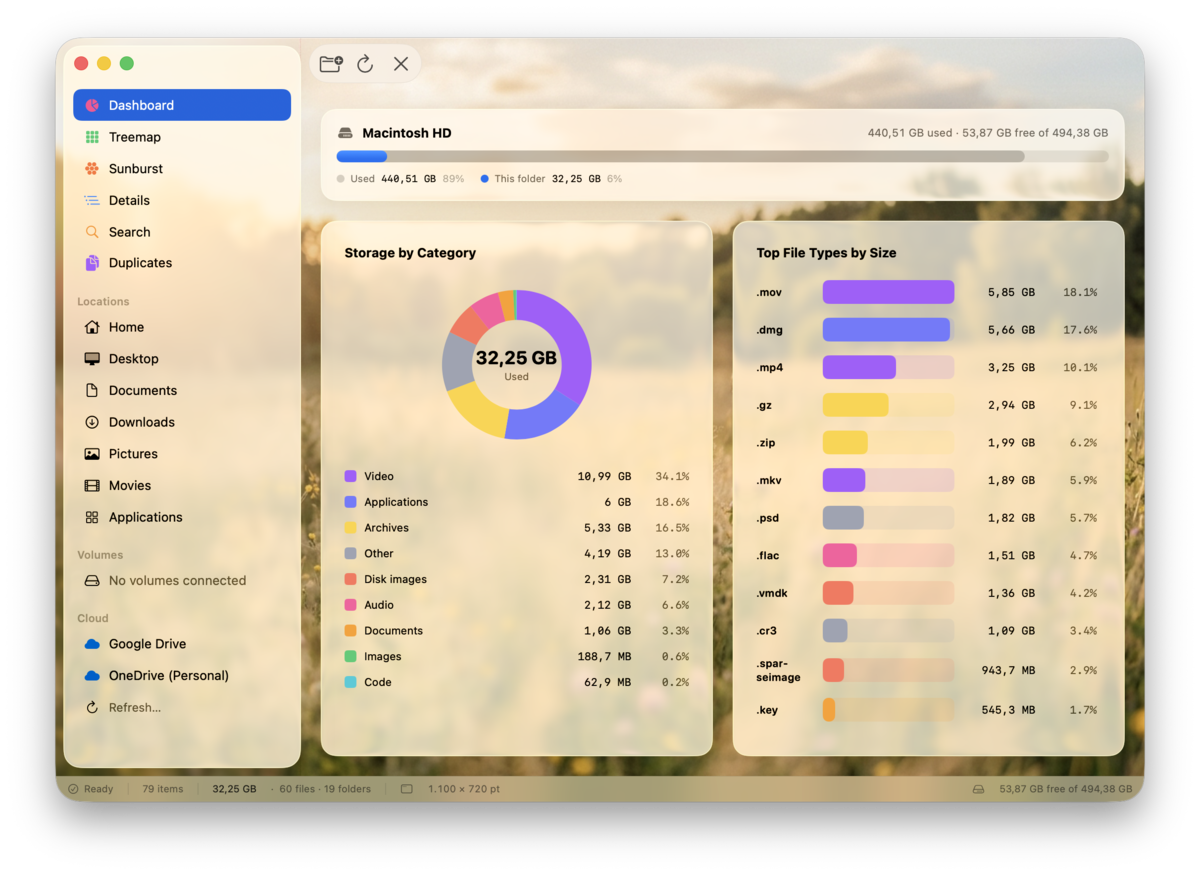
The idea
On Windows I had a habit: when the disk filled up, I opened an analyzer that showed me instantly where the space had gone, with folders listed right away and sizes filling in as it went. On the Mac I had no equivalent I actually wanted: the alternatives were either expensive, or looked like 2010, or sold a subscription for something you do twice a year.
So the spec was written in terms of behavior, not features: pick a folder, watch the result fill in live, and understand at a glance what is taking up the space. Native, macOS 26, with current system chrome. One-time price, no subscription. For a utility you open rarely, a subscription is simply hostile.
A note on the name, because it is a cheap trap and I did not see it coming: the working name in the first days belonged to a product that already existed on Windows. I changed it before publishing, and only then discovered that half the alternatives I had in mind were already taken by other products. "I am not aware of a product with that name" is not a trademark check. Search the App Store and the trademark registers before you freeze the name into a bundle id, a domain, and an icon.
The engine: one syscall per directory
The first version of the scanner used the obvious approach: contentsOfDirectory
to list, then resourceValues on every file to get its size. It works, but it
means one getattrlist per file, and across hundreds of thousands of files that
adds up.
I measured three variants on /Applications (452,000 files in 86,000
directories, warm cache, single-threaded):
| Variant | CPU | Note |
|---|---|---|
contentsOfDirectory + resourceValues per file | 7.5 s | the obvious approach |
FileManager.enumerator with key prefetch | 7.4 s | practically no difference |
getattrlistbulk | 2.8 s | one syscall per directory |
The conclusion that matters: prefetching keys on the enumerator does not
help, because it does not produce a cache hit in resourceValues, so
you still pay one syscall per file. The only thing that moved the needle was
getattrlistbulk: you open the directory once and ask for every attribute of
every entry in one go.
let fd = open(path, O_RDONLY | O_DIRECTORY)
getattrlistbulk(fd, &attrs, &buf, buf.count, FSOPT_PACK_INVAL_ATTRS)
2.8 seconds instead of 7.5, roughly two thirds less CPU, and over a third less wall clock time. The price is that you work directly with a binary buffer, and that is where the first serious trap lives.
The layout is not fixed
Every entry in the returned buffer has a layout that depends on the entry type.
Directory attributes are missing on files, file attributes are missing on directories, even
with FSOPT_PACK_INVAL_ATTRS. If you parse at fixed offsets, the first entry of
the other type desynchronizes you and you start reading garbage: absurd sizes, then a crash.
The correct way is to read ATTR_CMN_RETURNED_ATTRS first (the first field
after the length) and advance each field conditionally on its bit. The entry length
resynchronizes you between records, so one badly parsed entry does not contaminate the rest.
1.48 TB on a 500 GB disk
The first whole-disk scan reported 1.48 TB on a 500 GB SSD. Two different causes, both instructive.
The first: the scan descended into volumes that were not on the local
disk: an SMB share, a Time Machine over the network, simulators, mounted disk images. The
fix looked obvious: compare the child's volume identifier with the parent's. It does not
work. getattrlistbulk does not traverse the mount point, so it reports
the stub's identifier, meaning the parent volume's. The SMB share passed every
fsid check and tens of gigabytes of network storage got scanned happily.
The right answer is to ask the system directly whether the directory is a mount point:
if isDir, excludeMounts, mountStatus & DIR_MNTSTATUS_MNTPOINT != 0 { continue }The second: modern macOS has a firmlink, /.nofollow, that
exposes a complete copy of the root. To ls -ld it looks like an empty 64-byte
directory; in reality /.nofollow/Users has the same inode as
/Users. The result: the whole disk counted twice, some 620 GB showing up as a
folder with an odd name. The fix is the one du uses: remember the (device,
inode) pair for every directory and never recurse into the same object twice. Normal
firmlinks (/Users, /Applications) are not mount points, so they
stay scanned, which is exactly what you want.
What the App Store actually asks for
The code was the predictable part. Publishing has a list of steps you do not see until you hit them, and they are not in one end-to-end tutorial.
- Two distinct certificates: one that signs the app and one that signs the installer package. The second does not show up in a normal search for signing identities, because it carries an installer policy, so it is easy to believe it is missing.
- A registered App ID plus a dedicated App Store provisioning profile, copied where the system looks for it.
- A privacy manifest,
PrivacyInfo.xcprivacy. Without it the package is rejected automatically, before a human ever sees it. - A distribution build made strictly through
xcodebuild. - Upload through Transporter, where there is a trap I walked straight into.
The privacy manifest wants reason codes for every "required reason" API you touch. For a disk analyzer, those are:
| API | Code | Why |
|---|---|---|
| File timestamp | DDA9.1 + 3B52.1 | I display modification dates; I read metadata on user-selected files |
| Disk space | E174.1 | I show free space to help the user free some up |
| User defaults | CA92.1 | preferences, app-only |
The codes have to be the real ones from Apple's documentation. An assistant confidently proposed one to me that simply does not exist. Check them at the source.
The build trap cost me a discarded package: I had my own build script using
swiftc, fast and convenient for development. Except it does not compile the icon
catalog in the new format and does not trigger the system's Liquid Glass chrome. The app came
out with the old icon and without the native look: functionally correct, visually wrong. Any
build that goes out into the world goes through xcodebuild.
./package-mas.sh
pkgutil --check-signature build/export/DiskLens.pkg
And in Transporter: Validate does not mean Deliver. Validate checks the package and throws it away. I spent a while waiting for the build to appear in App Store Connect, after a perfectly clean validation, before realizing I had never uploaded it.
The last blocker was not technical at all. The app passed review on the first try and then sat at "Ready for Distribution" for days without being sellable, because the paid applications agreement in the business section was missing, with everything that comes with it (a US tax form included). If you sell from Romania, start the paperwork before you finish the code, not after.
The sandbox: what you cannot do, no matter what
The store build runs in the sandbox and can only read folders the user explicitly picks, with access preserved across launches through bookmarks. The hard consequence: it cannot scan the whole disk. Full disk access is reserved for non-sandboxed apps distributed directly, and an App Store app that tries to ask for it gets rejected. That is why serious disk analyzers are downloaded from their own site rather than the store. I chose to ship both: a sandboxed build in the store, and a separate notarized build for people who want the entire disk.
The everyday sandbox trap is subtler. Inside it, FileManager hands you paths
inside the app's container, while the file picker hands you the real path.
You compare two strings that look identical but are not, and wonder why nothing ever
matches. The real home comes from passwd:
let home = getpwuid(getuid())?.pointee.pw_dirReddit, or how two people wrote the next release
When it went live, I posted it in a macOS apps subreddit. No budget, no mailing list, nothing: one post. The reaction was not spectacular in volume, but two people did more for the product than any marketing plan.
The first, a paying customer, sent me a list of six concrete things that bothered him. Not "I do not like it", but: the file type list is cut off at eight entries and leaves empty space; the donut chart does not tell me which slice is under the cursor; the map will not let me drill into a folder; when I reopen the app I no longer see what I was looking at. All of them were true. All of them were things I saw every day and had stopped noticing. That became the next release, almost in full.
I refused exactly one item, and it is worth explaining why: he wanted the app to scan automatically at launch. That would have fixed the symptom (reopen and it is empty), but it would start heavy disk work every single time you open the app, possibly for a different folder than the one you want. The correct answer to the real complaint is to remember the result and show it instantly, without scanning. Feedback tells you where it hurts, not necessarily what to do.
The second reported something I could not reproduce: scanning the home folder hung for over 30 minutes. It worked on my machine. The difference was that he had OneDrive and Google Drive installed and I did not. Instead of changing the scanner on a guess, I built a separate signed and notarized build that logs every directory with the time spent in it and flags anything over a threshold. I sent it to him, he ran the scan until it hung, and he sent me the log.
The cause was obvious in the log: on cloud-synced folders, the call that reads attributes blocks, sometimes indefinitely, because the provider tries to materialize the content. Every blocked call held a thread from the pool, and a handful of such folders stalled the entire scan. The fix has two parts: do not recurse into directories flagged as having no local content (reading the flag does not trigger a download), and show cloud sizes in a separate section, read from the Spotlight index, without touching the files at all.
Counterintuitive bonus: Spotlight cannot tell you how much a file occupies on disk. For an undownloaded placeholder it reports the logical size even in the field that is supposed to be the physical one. Verified on a file with zero allocated blocks that was still reported as tens of kilobytes.
The third message, much later, was a single sentence: "iMazing backups are flooding my duplicate results". That became a folder exclusion feature. Good user requests are almost always one sentence long.
The numbers, without the hype
The full timeline:
| Date | What happened |
|---|---|
| 19 June 2026 | first commit |
| 21 June | scanner rewritten on getattrlistbulk |
| 22 June | submitted for App Store review |
| 23 June | approved on the first try |
| 25 June | live in the store, $2.99 |
| 27–28 June | first Reddit feedback |
| 4 July | first update submitted |
| 8 July | second update, live |
Real numbers from an ordinary day, nearly a month after launch: 768 impressions in the store, 231 product page views, and 29 new downloads. Conversion rate: 7.98%, against a typical store average of 2 to 5%.
The good conversion tells me the product page does its job: people who get there buy. The volume tells me few get there, so the problem is visibility, not the product. Those are two different conclusions with two different fixes, and it is easy to confuse them when you stare at a single number.
I also asked the silly question, because I had asked it myself: there are apps with a million downloads on day one. Yes, and they are free, on iPhone, from studios with marketing budgets. A paid macOS utility lives in another universe: it is measured in steady sales over months, not in one viral day. The best known competitor in this niche does not make millions either; it makes small, steady sales, for years. That is the realistic ceiling, and it is fine.
The feelings, because they are part of the story
The two days of waiting for review were disproportionately stressful compared to the actual stakes. I checked the status several times a day. Not for the money (at $2.99 there is no money to speak of) but because it was the first time something I wrote would be judged by an organization that can say "no" without explaining.
It passed on the first try. The joy lasted about two hours, and then came the feeling I did not expect to meet: now what? The app was live and nothing was happening. Nobody knew it existed. Publishing is not the finish line, it is the moment the part an engineer is not trained for begins.
And one observation about the first "it does not work for me": it hurts less than you think and it is more useful than any praise. The person who told me his scan hung actually handed me an entire feature I would never have built on my own, because I had no cloud storage installed, so for me the bug did not exist.
What I would do the same way again
- Measure before optimizing. The "obvious" fix (enumerator prefetch) gained nothing; the one that cut two thirds of the CPU was a syscall I did not know about. Without measurements I would have optimized the wrong thing.
- When a number makes no sense, it is a bug, not a quirk. 1.48 TB on a 500 GB disk was not a display error; it was two real bugs stacked on top of each other.
- Do not fix by guessing what you cannot reproduce. A logging build sent to the person who has the problem beats ten hypotheses written from home.
- Paperwork runs in parallel with the code. Certificates, agreements, tax forms: none of it resolves on the day you finish writing.
- Shipped does not mean finished. Two releases in three weeks, both driven by feedback rather than by my original plan.
DiskLens is on the Mac App Store, with details at disklens.vtun.ro. It requires macOS 26, costs $2.99 once, and collects nothing.